Pipedrive for Real Estate CRM
How a general sales CRM like Pipedrive can support real estate lead tracking, pipelines, follow-up, and team workflows.
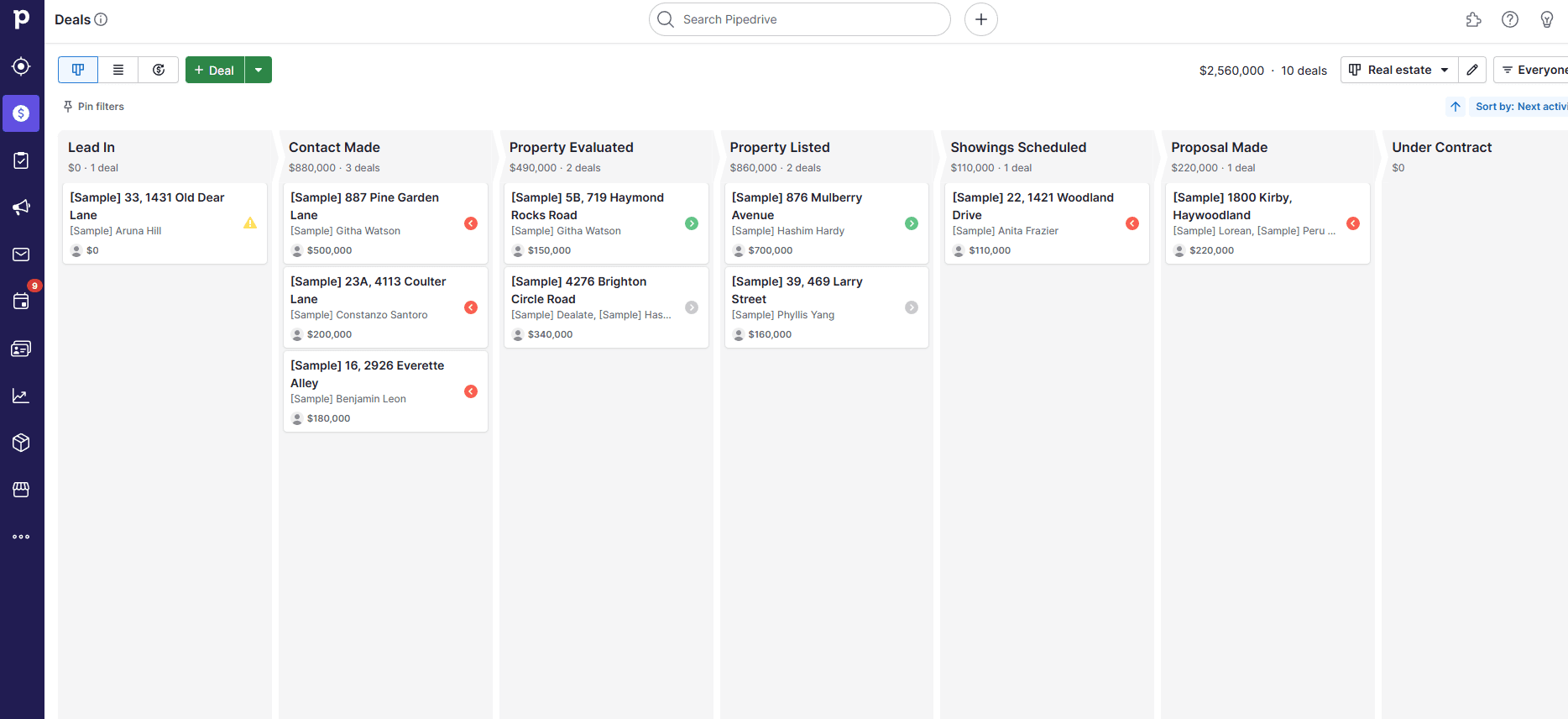
Pipedrive is not real-estate-specific, but its visual pipeline can map to prospecting, listings, negotiations, and follow-up. The right evaluation asks what it handles well and what still belongs in an IDX or transaction system.
Key takeaways
- Visual pipeline management can make next steps easier to see.
- Automation, mobile access, and integrations may reduce repetitive follow-up work.
- Real estate teams should confirm how property, transaction, and document workflows will be handled.
What a real estate CRM should cover
A useful CRM keeps contact information organized, makes next actions visible, and gives agents a reliable place to record conversations and deal progress. It should also make ownership, timing, and handoffs clear to the team.
Pipedrive’s core workflow
The source article centers on visual pipelines, mobile access, automated reminders, contact records, and deal tracking. Multiple pipelines or custom stages can represent different processes such as buyer leads, sellers, listings, or referral opportunities.
- Visual stages for leads and opportunities
- Custom fields for contact and property context
- Tasks, reminders, and follow-up automation
- Mobile updates for agents in the field
Lead capture and qualification
A team can evaluate how inquiries enter the system, how incomplete records are flagged, and how leads are routed to the next owner. Qualification fields should support real decisions—source, location, timeframe, budget, property type, and next action—rather than become a long form no one maintains.
Deal and transaction tracking
Pipedrive can provide a clear view of stages, expected actions, documents, and progress. Keep the boundary clear: a sales CRM may organize the relationship and opportunity without replacing a brokerage’s transaction-management, compliance, or MLS systems.
Documents, reporting, and collaboration
The guide also discusses document context, progress monitoring, team collaboration, and reporting. Confirm permissions, file retention, audit needs, and whether reports can answer the questions the team actually asks each week.
Integrations
Examples in the source include API connections and integrations with tools such as QuickBooks, Trello, Slack, JustCall, Autopilot, and Xero. Verify current availability, sync direction, field mapping, and whether a connector adds cost before designing the workflow around it.
A measured fit
Pipedrive can be evaluated as a flexible sales CRM for real estate. It should not be presented as a full replacement for every IDX, transaction-management, or brokerage system without a specific integration and compliance review.
Questions to answer in a trial
Can the team capture a lead, qualify it, assign it, schedule follow-up, attach the right context, move it through a pipeline, and export the record? A complete test will expose missing real-estate features faster than performance statistics or generic ratings.